
Editing photos used to be such a difficult task. You had to download heavy software, learn complicated tools, and spend hours to get just one perfect shot. But now, with Google Gemini AI Photo Editing Prompts, everything has become incredibly easy and fast.
Table of Contents
- What Is Google Gemini AI Photo Editing?
- How to Get Google Gemini AI Photo Editing Prompts
- Why Everyone Loves Gemini AI
- Easy Steps to Use Gemini AI Photo Editing Prompts
- Top 10 Google Gemini AI Photo Editing Prompts
- Trending Gemini Photo Styles
- Viral Instagram Edits Using Gemini AI
- Fast Editing with Lightroom & Snapseed QR Codes
- Tips for Creating Stunning Gemini AI Photos
- Conclusion – Why You Should Try Gemini AI Today
What Is Google Gemini AI Photo Editing?
Google Gemini AI is a smart photo editing assistant that helps you transform your photos instantly. You simply write what you want to change—called a prompt—and Gemini automatically edits your photo like a professional designer.
You don’t need to learn complex software anymore. Just describe your idea clearly in English, and Gemini does the rest. Whether you’re a beginner or a pro, it works beautifully for everyone.
Why Everyone Loves Gemini AI
Gemini AI feels almost magical—it’s like it can read your mind! Type a few words such as “sunset background with soft light,” and suddenly your photo looks like it was shot by a professional photographer.
It’s no wonder the tool has gone viral on Instagram, with trends like Google Gemini viral photo editing, girls Gemini photo prompts, and hug photo editing taking over the platform.
Easy Steps to Use Google Gemini AI Photo Editing Prompts
Using Gemini AI is simple and fun. Just follow these quick steps:
- Open Google on your mobile or computer.
- Search for Gemini AI and open the official website.
- Log in using your Gmail account.
- Tap the “+” icon to open your gallery.
- Select and upload your favorite photo.
- In the text box, paste your photo prompt (like the examples below).
- Hit Send and wait a few moments.
- Your perfectly edited photo will appear—just click Save to download it.
If you face any issues, leave a comment or message for support—the community is always ready to help.
Top 10 Google Gemini AI Photo Editing Prompts
Here are 10 creative prompts to try today and make your photos go viral:
- “Replace background with a calm sunset beach scene, soft golden light, natural shadows.”
- “Create a winter wonderland theme, light snowfall, cozy mood, and warm tones.”
- “Hyper-realistic portrait in messy dark hair, pink shirt, standing in front of bright pink bougainvillea.”
- “Editorial portrait with trendy black shades, neon light, and newspaper background.”
- “3D cinematic look with dramatic shadows and bokeh lighting.”
- “Soft pastel portrait with vintage tones and floral surroundings.”
- “Studio-style shoot with perfect white lighting and clean backdrop.”
- “Artistic black-and-white portrait with moody highlights.”
- “Travel photo look – tropical beach, blue sky, and palm leaves.”
- “Dreamy romantic style with soft focus and gentle color glow.”
Try these prompts and see how your regular photos transform into stunning art pieces.

Create a hyper realistic portrait shot of myself in a dark messy hair style, wearing and pink button-up shirt, with a soft smile. he stands in front of a vibrant wall of bright pink bougainvillea flowers. Serene, romantic, floral portrait. keep the face 100% same as in image shared.
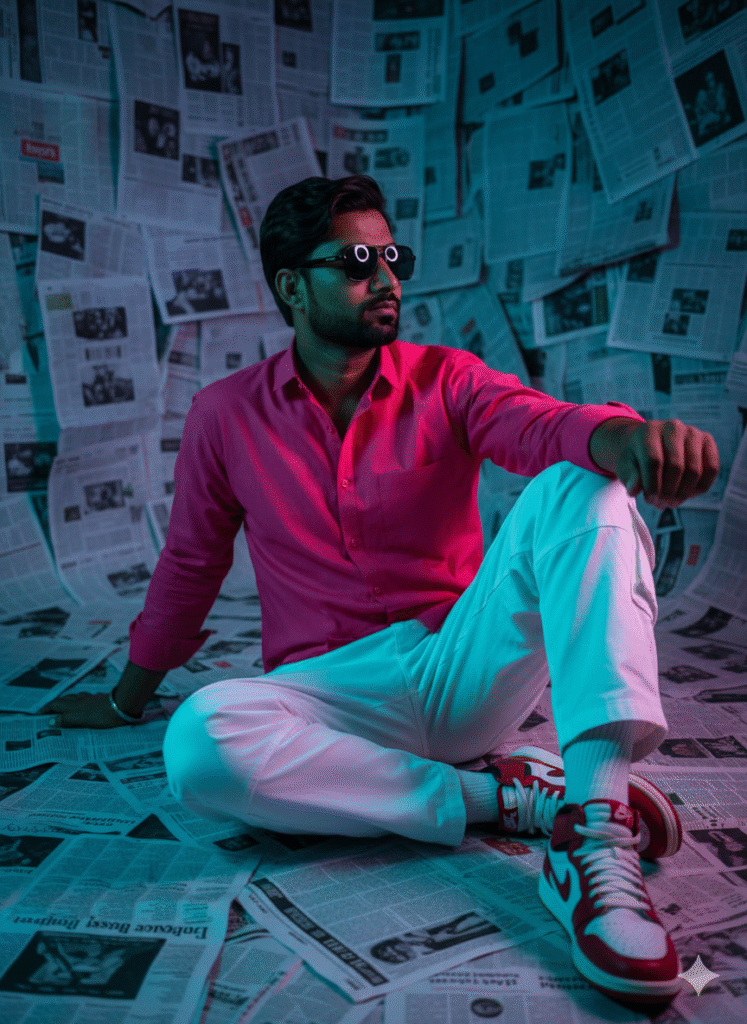
Using the uploaded photo (keep original face 100%), generate a cinematic editorial portrait. Outfit: black trendy shades, rani pink shirt and with collar.cargo white pants, white socks, white and red Nike air Jordan sneakers. Pose: seated on the floor, legs bent, leaning back, one arm raised, looking to the side. Background: room fully covered with overlapping black-and-white newspapers on walls and floor. Lighting: neon moody, soft low-key light, shallow depth of field,
Prompt:
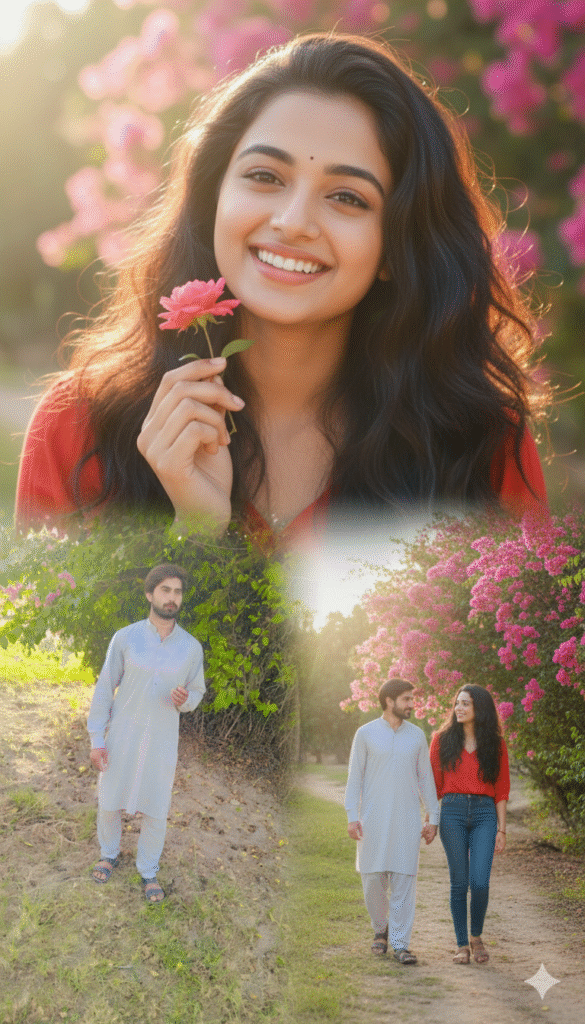
Create a realistic, high-detail 4K collage portrait of a young Indian couple(same face as in the uploaded image, 100% accurate face matching She has long, dark, wavy hair, glowing skin, and a soft, joyful expression in red top and blue jeans. They appears in three beautifully blended poses within a dreamy collage. Close-up: She smiles brightly, playfully holding a small pink rose n

promt:
This image places the man in a mysterious, glowing forest at night. Attire and Accessories: He is wearing a crisp white collared shirt with a distinctive pattern of blue floral branches and leaves. He is also wearing white trousers. Accessories are simple: a gold chain necklace and a dark square-faced watch with a gold band. Setting and Props: The environment is dark and appears to be a magical forest or thicket. The background is filled with out-of-focus, vibrant blue circular bokeh lights,

Prompt:
The uploaded man portrait of a person with spiky, stylishly messy hair, possibly with a hint of color like purple or blue highlights. They are wearing a bandana across their forehead, featuring a subtle pattern. One eye is visible and intensely focused, while the other side of their face is partially obscured by their arm. The hand is brought up to partially cover their face. The background should be dark and subtly lit, perhaps with a deep blue or purple hue to match t hair.
Trending Gemini Photo Styles
Some of the most popular Gemini AI trends on social media right now include:
- Google Gemini Winter AI Photo Prompts
- Google Gemini 3D AI Photo Editing
- Google Gemini Hug Photo Prompts
- Girls Gemini Photo Editing Prompts
Each style offers a different creative touch, perfect for Instagram reels, profile photos, or even professional portfolios.
Fast Editing with Lightroom & Snapseed QR Codes
Another amazing feature is how Gemini AI works seamlessly with Lightroom and Snapseed QR codes. You can instantly fix lighting, colors, and tones to make your photo look balanced and professional in seconds—no manual adjustment needed.
Tips for Creating Stunning Gemini AI Photos
- Always use clear, descriptive language in your prompts.
- Experiment with lighting styles like “soft light” or “neon tone.”
- Keep your original face 100% intact for realistic edits.
- Mix and match background themes (nature, studio, street, fantasy).
- Save and compare your edits to learn which styles suit you best.
Conclusion – Why You Should Try Gemini AI Today
At first, you might think using AI for photo editing is difficult—but once you try Google Gemini AI Photo Editing Prompts, you’ll realize how simple it really is.
With just a few words, you can create viral, professional-looking images that stand out online. Whether you’re a content creator or just love editing photos for fun, Gemini AI will completely change how you work.
So what are you waiting for? Join now and start creating your dream photos today!